Beginner guide
What is Git? A plain-English explanation
Git is a free, open-source version control system. It records every change to a project's files, so you can see who changed what, go back to any earlier version, and let many people work on the same code without overwriting each other.
Linus Torvalds created Git in 2005 to manage development of the Linux kernel, and Junio Hamano has maintained it since later that year. Today it's the standard version control tool across the software industry, used for everything from solo side projects to the largest codebases in the world.
How Git works
Git doesn't store a list of edits. Each time you commit, it saves a snapshot of your whole project and gives that snapshot a unique ID (a hash like 3f2a1c9). Files that didn't change are stored as links to the previous copy, so snapshots stay small.
Your changes move through three local areas, then optionally to a remote server:
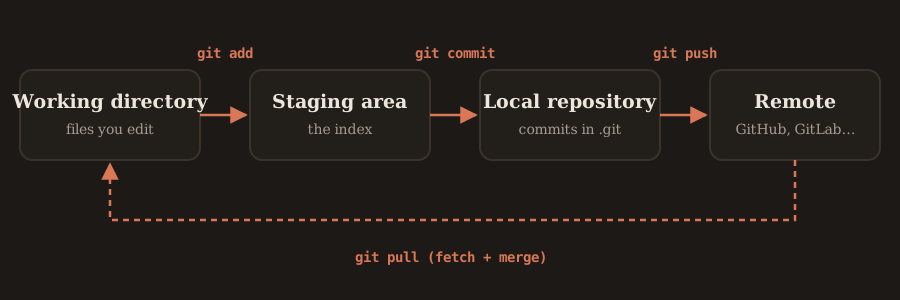
- Working directory: the files you see and edit.
- Staging area (also called the index): the changes you've picked for the next commit, using
git add. - Local repository: your saved history, stored in a hidden
.gitfolder.git commitputs snapshots here. - Remote repository: a copy on a server, usually named
origin.git pushsends commits there;git pullbrings others' commits back.
Why Git is called "distributed"
Older systems like Subversion (SVN) keep the history on one central server; you need a connection to commit or browse history. Git is distributed: every clone is a full copy of the repository, including its entire history. You can commit, branch and read the log offline, and every developer's copy is effectively a backup.
Key Git terms
| Term | What it means |
|---|---|
| Repository (repo) | A project folder that Git tracks. The history lives in its .git folder. |
| Commit | A saved snapshot of the project, with a message, an author and a unique hash. |
| Branch | A movable pointer to a line of commits. You build a feature on a branch, then merge it back. |
| HEAD | A pointer to the commit you're currently on, usually the tip of your current branch. |
| Merge | Combining the history of one branch into another. |
| Merge conflict | When two branches changed the same lines and Git needs you to choose the result. |
| Remote / origin | A copy of the repo on a server. origin is the default name for the one you cloned from. |
| Clone | A full local copy of a remote repository, made with git clone. |
Git vs GitHub
Git is the tool; GitHub is a service. Git runs on your computer and manages history. GitHub, GitLab and Bitbucket host Git repositories online and add collaboration features like pull requests, code review, issues and CI pipelines. You can use Git without any of them, and the same Git commands work with all three.
How many Git commands are there?
Git ships with about 150 commands. Run git help -a to list every one installed on your machine. They fall into two groups:
- Porcelain commands (about 40): the user-facing ones like
git add,git commit,git pushandgit merge. - Plumbing commands: low-level building blocks like
git hash-objectandgit update-ref. Scripts and Git itself use these; you'll rarely type them.
Most of what you'll learn is options, not new commands. git reset is one command, but --soft, --mixed and --hard make it behave very differently, as the git reset guide explains.
Your first five minutes with Git
git --version                      # check Git is installed
git config --global user.name "Your Name"
git config --global user.email "you@example.com"
git init                           # start tracking the current folder
git add .                          # stage every file
git commit -m "First commit"       # save the snapshot
From here, the complete Git commands list has everything else, grouped by task.
FAQ
Is Git free?
Yes. Git is free and open source, released under the GNU General Public License version 2.
Do I need GitHub to use Git?
No. Git works entirely on your own computer. GitHub, GitLab and Bitbucket are optional hosting services for sharing repositories and collaborating.
How do I check if Git is installed?
Open a terminal and run git --version. If it prints a version number, Git is installed.